100% Private · Open Source · Auditable

Automate Daily Tasks With Absolute Safety

Tessera is a secure desktop application that automates your business routines—like supply chain tracking, customer reports, and data entry—locally on your computer. Keep your data private, avoid AI mistakes, and approve critical updates before they happen.

Tessera Desktop Workspace
Secure Local Mode
SJ

Task Approvals

review and approve updates

Disruption Alert Just now

Confirm Supply Chain Alternative Port

Tessera detected shipping delays at Port of Long Beach. It has calculated the impact and recommends rerouting affected items.

Supplier Affected Shipments Recommended Backup Port Urgency
Apex Parts 2 Shipments Port of Oakland High
Global Logistics 1 Shipment Port of Seattle Medium

See Tessera in Action

Switch tabs below to see how Tessera keeps your business running smoothly and securely.

Built for Business Owners Who Value Safety

Get the benefits of advanced AI automation without the risk of data leaks or mistakes.

100% Private Business Data

Your customer lists, reports, invoices, and financial records are processed entirely on your computer's hard drive. Your data never goes to third-party servers.

One-Click Undo

Tessera records all document edits in a local workspace history. Easily compare what the AI updated side-by-side and undo changes with a single click.

Structured Automation

You choose the exact steps for your tasks (like scanning port arrivals or updating supplier sheets). The AI carries out your plans without wandering off-track.

Secure Vault Protection

All app logins and software passwords are encrypted and locked behind your computer's built-in security chip.

Easy Setup

Add support for external software connectors, templates, and spreadsheets in seconds only when your daily tasks require them.

How Tessera Automates Safely

Tessera works directly on your desktop, executing tasks according to your guidelines and checking with you before completion.

1. Your Files & Tools

Spreadsheets, emails, and files stored on your computer

Read data
2. Tessera Local App

Automatically processes data and drafts files locally

Sends draft
3. Approval Inbox

You review the draft and click Approve to finalize

Take a Look Inside

Tessera provides a clean, calm, and distraction-free interface for configuring your AI assistant guidelines.

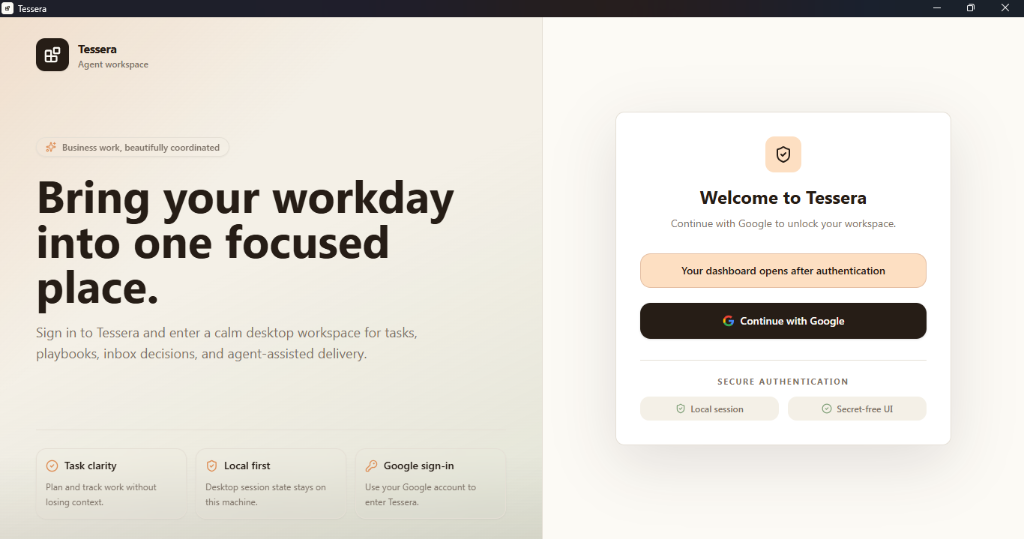
Tessera Welcome Screen

Welcome Screen: A clean login gate protecting your local session. All data is locked to your Windows or Mac user profile.

Open by Design

Tessera is free, open-source software. Don't take our word for how it handles your data — read the code, self-host it, and help shape where it goes.

Auditable

Read every line. Nothing is hidden — you can verify for yourself that your business data stays on your computer.

No Lock-In

Fork it, self-host it, run it forever. No vendor can hold your automations hostage or shut off access.

Built in the Open

Issues and pull requests are public. Contribute a fix, request a feature, or help steer the roadmap.

Apache 2.0 licensed · Free forever

Download Tessera Desktop

Get the local desktop app for your computer to start automating business operations safely.

macOS

v0.1.0 • For Apple Mac computers

Windows

v0.1.0 • For Windows PCs

Linux

v0.1.0 • For Linux systems

Frequently Asked Questions

How is Tessera different from ChatGPT or other chatbots?

Chatbots are open-ended conversational assistants that can easily make mistakes or leak your data to public servers. Tessera is a private application that runs templates with defined, step-by-step rules. The AI only performs specific parsing tasks you approve, so it cannot act on its own.

What is a Supply Chain Risk automation template?

It is a pre-built workspace setup that automatically scans shipping routes and ports, cross-references delays with your spreadsheet of suppliers, and sends a simple alert to your inbox if a shipment is at risk, suggesting the best alternative ports.

Is my business data shared with anyone?

No. All databases, supplier files, activity logs, and passwords stay stored locally on your own computer. Tessera does not collect or upload your business data.

Do I need coding experience to use Tessera?

No coding experience is required. You can load pre-built templates for common tasks (like lead routing, invoice parsing, and port tracking) and customize guidelines using plain language.

How does Tessera connect to my existing business tools?

Tessera connects using secure local integrations. You can link local spreadsheets, email templates (Gmail/Outlook), search providers, and CRM software (like HubSpot) using system credentials safely encrypted inside your computer's built-in keychain.

What are the computer system requirements?

Tessera is lightweight and optimized for local desktop performance. It runs on Windows 10/11, macOS (Intel and Apple Silicon M1/M2/M3/M4), and standard Linux distributions. It runs efficiently in the background without slowing down your computer.

Can I share automation templates with my team?

Yes. Since Tessera templates are saved as simple files on your hard drive, you can easily share them with team members using standard shared folders (like Google Drive, OneDrive, or Dropbox) or sync them using private team repositories.

Is there a monthly subscription fee?

No. Tessera is a free, open-source desktop application. There are no monthly software subscriptions or licensing fees. You only pay directly to your chosen AI provider (such as OpenAI or Anthropic) for the raw tokens your local playbooks consume, with zero markups.

Can I self-host or contribute to Tessera?

Yes. Tessera is Apache 2.0 licensed, so you're free to fork it, modify it, and self-host it indefinitely. The source, issues, and pull requests are all public on GitHub — contributions and feature requests are welcome.

How do I backup my playbooks and history?

All your playbooks, local SQLite databases, style settings, and logs are stored inside a single directory (.tessera) on your computer. Simply copy this directory to an external drive or configure your automated backup software to include it.
Copied to clipboard!